Personal security
How to Stop Your Phone Tracking You
Your phone reports your position through several channels at once, and turning off the obvious one doesn’t stop the others. Here’s each channel, in order of how easy it’s to close.
- Easiest win
- App location permissions
- Tracks with GPS off
- Wi-Fi and Bluetooth scanning
- Can’t be switched off
- Cell tower registration
- Only true blackout
- Powered off, or a Faraday bag
You’re tracked whether or not you’re using the phone. Location comes from several sources simultaneously, and companies, advertisers and anyone who buys from them all end up with pieces of it. Work down this list in order and each step closes a channel.
1. App permissions
This is the largest single leak and the easiest to fix. Apps ask for location for reasons that are frequently unrelated to what they do. Social apps, games and shopping apps are the worst, and many keep collecting in the background when you aren’t using them at all.
Go into settings and review every app that has location access. Set anything that doesn’t genuinely need it to Never, and anything that does to While Using the App. Almost nothing legitimately needs Always except navigation and a deliberate family-tracking app.
While you’re in there, turn off the advertising identifier as well. On iPhone that’s Settings → Privacy & Security → Tracking. On Android it’s under Settings → Privacy → Ads. That identifier is what stitches your movements across apps into one profile that gets sold.
2. Location services
Location services combine GPS, Wi-Fi and Bluetooth to fix your position. Useful for navigation, and it’s also how your phone knows where you’re when you’re doing nothing at all. Turning the whole system off at the OS level is a blunt instrument, but it’s the most effective single switch you have short of airplane mode.
Check the system services underneath it too. Both platforms keep a significant locations or location history log that records the places you spend time. It’s on by default, most people have never looked at it, and it’s startlingly detailed. Turn it off and clear it.
3. Wi-Fi and Bluetooth
These track you even when you aren’t connected to anything. Your phone broadcasts requests looking for networks and devices, and retail analytics systems log those broadcasts to follow footfall through a building. Switching both off in public closes that channel.
Note that on iPhone, the toggles in Control Center don’t fully disable either radio — they only disconnect. Turn them off in Settings if you mean it.
4. Cell tower triangulation
Here’s the one you can’t fix. With GPS off, Wi-Fi off and Bluetooth off, your phone still registers with nearby towers, and the relative signal strength across several towers gives a usable position. It’s less precise than GPS — typically a few hundred meters, tighter in a city with dense towers — but it’s continuous and it exists whenever the phone is powered on with a SIM in it.
There’s no setting for this. The phone has to be talking to the network in order to receive a call. Airplane mode stops it, and so does powering off. Nothing else does.
5. A VPN, for the other kind of tracking
A VPN does nothing about GPS or cell towers, and anybody who tells you otherwise is selling something. What it does is hide your IP address from the sites and apps you use, which stops them from inferring your city that way and stops your provider from logging which services you connect to.
It’s a partial measure aimed at a different problem. Worth having, but not for this one. I use Proton, which includes a VPN with its bundled plans. This is my referral link if you want to support the site while you’re signing up.
6. A Faraday bag, when it has to be certain
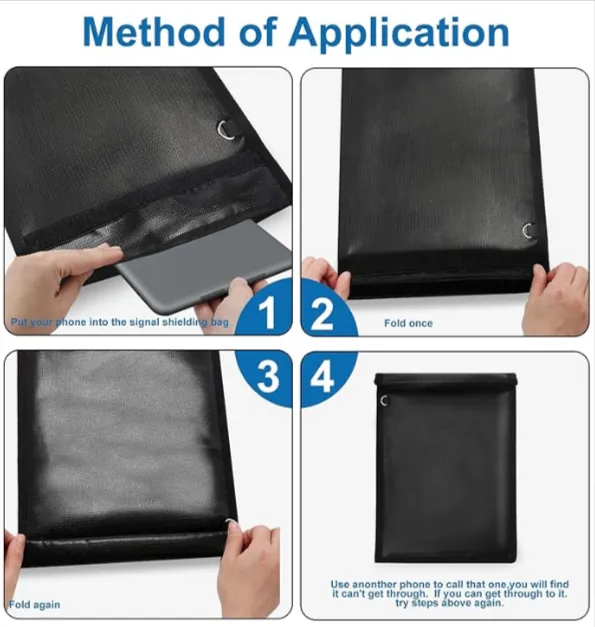
A Faraday bag is a lined pouch that blocks radio in and out. Inside one, the phone can’t reach a tower, can’t be located and can’t receive anything. It’s the only way to be certain short of pulling the battery, which on a modern phone you can’t do.
Two practical notes. It has to be sealed correctly — a bag left loosely folded does not work, and that’s the usual reason people think theirs is faulty. And the phone will burn battery hunting for signal the entire time it’s in there, so expect it to come out warm and lower than you left it.
Worth having if you’re handling a device as evidence, if you’re somewhere you don’t want logged, or if you simply want a few hours genuinely disconnected. This is the one I use, through an affiliate link.
Disclosure. The Proton and Amazon links above pay a commission. They cost you nothing extra and neither one changed what’s written here.
The everyday version
If you aren’t going to carry a Faraday bag around, this list on its own gets you most of the benefit:
- Review app location permissions every few months, and after any big OS update — updates quietly re-prompt and people tap Allow to make it go away
- Set everything you can to While Using the App
- Turn off location history and clear what’s stored
- Reset your advertising identifier, then turn ad tracking off
- Kill Wi-Fi and Bluetooth when you’re out and not using them
- Use airplane mode when you genuinely want to be unreachable
None of this makes you invisible. It reduces how much of your movement is collected, retained and sold, which is a realistic goal, unlike invisibility.